Technology implementation is the process of embedding a new system into how a business actually operates — its workflows, its people and its data — not just installing software and granting access. Most technology that fails to deliver results wasn’t the wrong choice. It was treated as a purchase to complete rather than a change to manage, and the gap between those two things is where most of the expected value quietly disappears.
This distinction matters because it changes where the blame goes, and more importantly, where the fix needs to happen. A business that concludes “the software didn’t work” after a failed rollout usually replaces the tool and repeats the same shallow process — then wonders why the next one fails too.
Why Technology Projects Actually Fail
Technology rarely fails on its technical merits. It fails because the business around it wasn’t ready to absorb it — and “ready” covers more ground than most project timelines account for.
- The team configuring the system never fully understood how the business actually works day to day
- Staff were given login credentials but no real training on how their job changes
- Old data was migrated as-is, carrying years of inconsistency and errors into the new system
- Leadership signed off on the purchase but disappeared after kickoff, signalling it wasn’t a priority
- Nobody measured whether the new system actually improved anything, so problems went unnoticed until they were expensive
A business doesn’t fail at technology. It fails at the change technology was supposed to produce.
Buying vs Implementing: Where the Real Work Begins
Buying technology is a transaction. Implementing it is a process — and conflating the two is the single most common reason expected results don’t materialise. A signed contract and a working login page represent the very beginning of implementation, not the end of it.
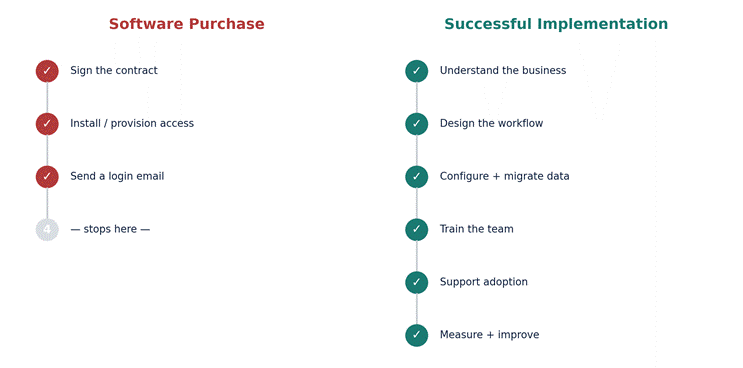
The steps that get skipped — understanding the business, designing the workflow around the tool, training the team properly, and following up after launch — aren’t optional extras. They’re the actual work. Everything before that is just procurement.
Understanding the Business Before Configuration
Every piece of business software ships with default settings built for a generic company that doesn’t exist. Configuring a system without first understanding how the specific business actually operates — its approval chains, its exceptions, its seasonal patterns — produces a tool that technically works but fights the business at every turn.
This is the step most frequently rushed, usually because it doesn’t feel like progress. Understanding doesn’t produce a visible deliverable the way configuration does, so it gets compressed into a single kickoff call instead of the weeks it actually needs.
Process Readiness: Is the Workflow Ready to Be Digitised?
A process that’s inconsistent, undocumented, or dependent on one person’s judgement doesn’t become reliable by being put into software — it becomes an inconsistent, undocumented process with a nicer interface. Process readiness means the workflow has been clearly defined and agreed on before anyone starts configuring a system around it.
Same Process, New Interface: Why “Digitising” a Broken Workflow Doesn’t Fix It
This is the pattern that quietly wastes the most implementation budget: a genuinely broken process gets moved into a new system without being redesigned, and the business ends up with the exact same bottlenecks, just wearing a digital interface.
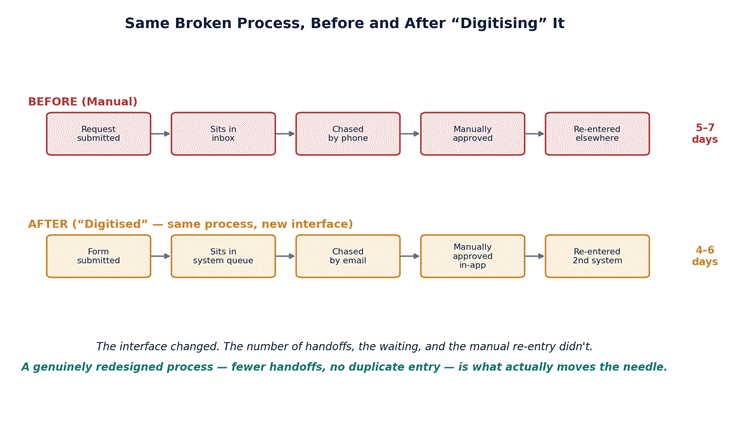
The fix isn’t a better tool. It’s redesigning the process itself — removing unnecessary handoffs, eliminating duplicate data entry, clarifying who approves what — before any system gets built around it. A simplified process in a basic tool consistently outperforms a complex process in sophisticated software.
Data Migration: Carrying the Past Into the Present
Data migration is where old problems become new ones if it’s rushed. Years of inconsistent entries, duplicate records and outdated fields don’t get cleaned up by being moved into a new system — they get carried over intact, now with the added credibility of living in a shiny new platform. A deliberate data-cleaning pass before migration is one of the highest-leverage, least glamorous steps in the entire process.
User Training: The Step Most Often Compressed
Training gets compressed under deadline pressure more than almost any other implementation step, because it’s the easiest to shrink without anyone immediately noticing the cost. A single onboarding session rarely builds the confidence a team needs to actually change how they work — it builds just enough familiarity to limp through the basics while reverting to old habits under pressure.
Effective training accounts for the fact that people learn a new system by using it in real scenarios, not by watching a walkthrough once. Role-specific training, a grace period with real support available, and a clear channel for questions all matter more than the length of the initial session.
Leadership Involvement: Why It Can’t End at Sign-Off
Staff take their cues from what leadership visibly cares about, not from what a memo says. A leader who signs the contract and then disappears from the rollout sends a clear, if unintended, signal: this isn’t actually a priority. Visible leadership involvement throughout the rollout — not just at kickoff — is one of the strongest predictors of whether a team actually adopts a new system or quietly reverts to the old way of working.
Introducing The Snazzy Implementation Cycle™
To make this concrete, we built The Snazzy Implementation Cycle™ — seven stages that take a technology purchase from understanding the business all the way to measured, ongoing improvement.
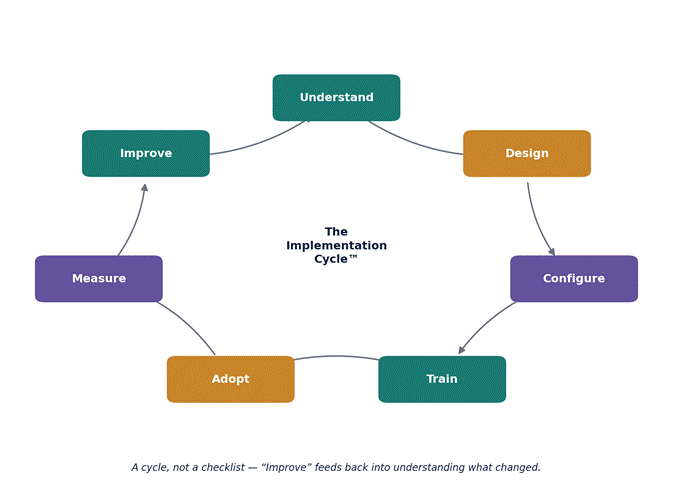
Each stage builds on the one before it: Understand informs Design, Design shapes how the system is Configured, Configure determines what Training actually needs to cover, Train enables genuine Adoption, Adoption is what gets Measured, and Measure feeds directly into Improve — which loops back into a deeper Understanding of what’s actually working. Skipping a stage doesn’t speed up the cycle. It just means the skipped step resurfaces later, usually as a support ticket or a team quietly working around the system.
People + Process + Technology: Why All Three Have to Move Together
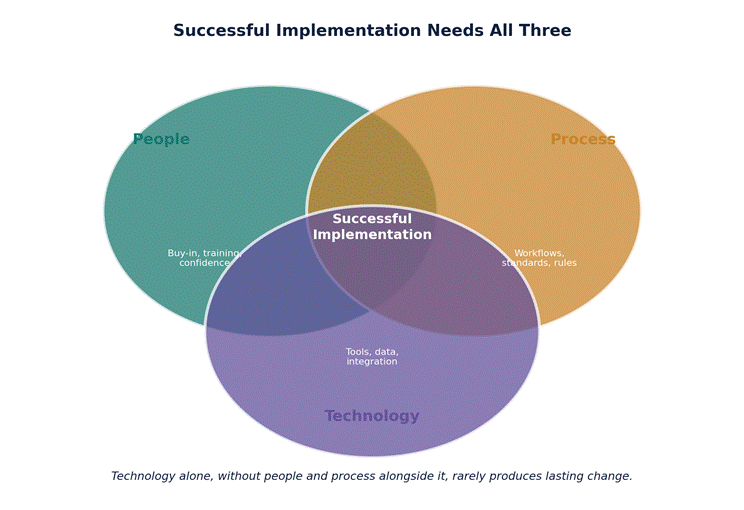
Implementation fails most often when one of three elements is treated as sufficient on its own. Technology alone produces a tool nobody uses correctly. Process alone produces a plan nobody has the system to support. People alone — enthusiasm and good intentions — can’t compensate for a broken workflow or the wrong tool.
Post-Implementation Support: The Phase Most Businesses Skip
The weeks immediately after go-live are when a system either becomes part of how the business genuinely works, or quietly gets worked around. This is precisely when many implementation teams and vendors step back, treating launch as the finish line rather than the start of the phase that determines whether any of the preceding work pays off. Dedicated support during this window — someone available to answer questions and fix friction fast — directly determines whether early frustration becomes lasting resistance or gets resolved before it hardens into habit.
Measuring Implementation Success
A successful implementation isn’t measured by whether the system is technically live. It’s measured by whether the business outcome it was meant to produce actually materialised — faster processing times, fewer errors, better visibility, whatever the original business case claimed. Revisiting that original business case a few months post-launch, honestly, is the step most businesses skip entirely — which is exactly why so many organisations can’t say with confidence whether a given piece of technology actually paid for itself.
Implementation Readiness Checklist
Before kicking off a new implementation, a quick gut-check against the basics:
☐ The current process has been documented and agreed on, not just assumed
☐ Someone has mapped how this specific business works, not just the vendor’s default setup
☐ A realistic data-cleaning pass is scheduled before migration, not during it
☐ Training is role-specific and scheduled beyond a single kickoff session
☐ A named leader will stay visibly involved through launch and the weeks after
☐ Success will be measured against the original business case, on a set date
Frequently Asked Questions
Why do most technology implementations fail to deliver expected results?
Most failures trace back to treating implementation as a one-time software installation rather than an ongoing change process — skipping proper process redesign, data cleanup, role-specific training, or sustained leadership involvement after launch.
Should a business fix its processes before or after adopting new technology?
Before, wherever possible. Digitising a broken or inconsistent process typically preserves its bottlenecks in a new interface rather than resolving them — process redesign should come first.
How long does a proper technology implementation take?
It varies by system complexity, but a realistic timeline includes meaningful time for understanding the business and designing the workflow before configuration even begins, plus a structured support period after launch — rushing straight from purchase to go-live is one of the most common causes of a failed rollout.
The Takeaway
The technology business leaders invest in is rarely the problem. The process used to bring it into the business usually is. Implementation isn’t a step that happens after the real decision has been made — it is the decision, worked out in practice, one stage at a time. Start with the business, not the software, and the technology has a far better chance of actually delivering what it was bought to do.
Start with the business, not the software.

Joshua Fasinu is a Computer Science student and technology enthusiast passionate about using technology to solve real-world problems. At Snazzy Digital Techspace, he contributes to technology, automation, product development, and digital innovation, while also exploring AI, software development, and business process automation.
He is driven by a desire to learn, build, collaborate, and create digital solutions that make work and everyday life better.