Stop Automating Everything. Automate What Slows Your Business Down.
Most businesses get this backwards. A tool promises to “automate everything,” leadership buys in, and six months later half the business is running on automated workflows nobody fully understands — while the process that was actually costing the business time and money is still done manually, because nobody stopped to ask which processes mattered.
Business process automation is the use of technology to perform repetitive, rule-based business tasks without manual input — freeing people to focus on work that requires judgement. But automation only creates value when it’s applied to the right process. Automating a broken workflow doesn’t fix it; it just makes the business fail faster and more consistently. Before automating anything, the real question isn’t “can this be automated?” It’s “should it be?”
Automation is not a single tool or category of software. It’s a design decision applied to a specific workflow: taking a task that follows a predictable, repeatable set of rules and letting a system execute it without a person manually doing each step. Sending a follow-up email after a form submission, routing an invoice for the correct approval, updating a spreadsheet when a sale closes — these are automation candidates because they follow the same logic every time.
What Automation Actually Means
Tasks that require judgement, negotiation, relationship management, or context-specific decision-making are poor automation candidates, no matter how repetitive they feel. Automating them doesn’t remove the work — it just removes the person best equipped to notice when something’s gone wrong.
Automation doesn’t ask a process to be better. It asks a process to run exactly the same way, every time, faster. If the process is broken, automation just breaks it at scale.
Why Bad Processes Should Be Fixed Before They’re Automated
This is the mistake that causes the most wasted automation spend: teams automate a process that was never designed properly in the first place. If an approval workflow currently takes six days because it routes through three people who don’t know they’re supposed to sign off, automating that workflow will still take six days — it’ll just look more sophisticated while doing it.
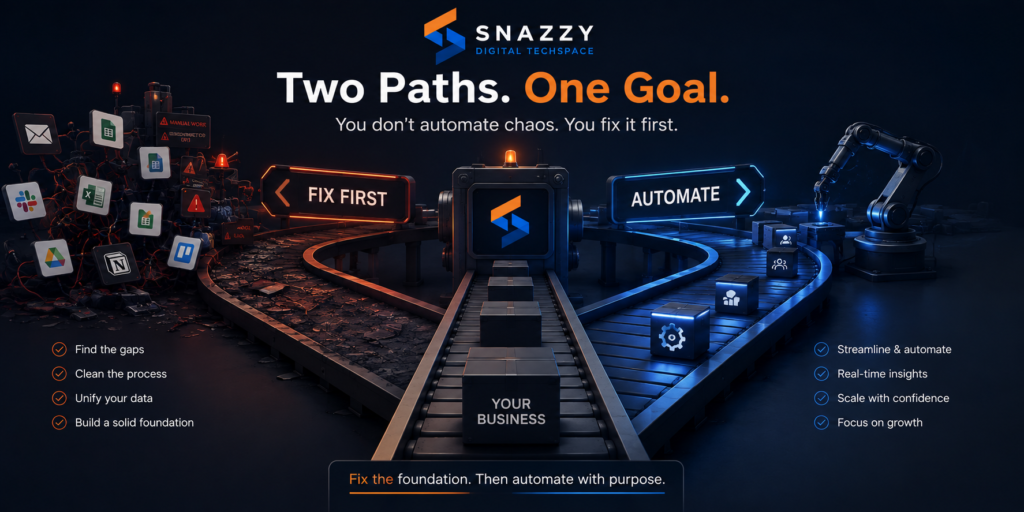
Automation amplifies whatever process it’s applied to. A well-designed process becomes faster and more reliable. A poorly designed process becomes faster and more reliably wrong. That’s why the sequence matters: fix the process, then automate it — not the other way round.
Signs a Process Needs Fixing, Not Automating
- The process has no clear, documented steps — different people do it differently
- It requires input or approval from someone who isn’t consistently available
- The rules for “what happens next” change depending on who’s asking
- Errors happen regularly and get corrected manually, off the record
- Nobody can explain why the process has the steps it currently has
If any of these apply, redesign the workflow first. Automating it will only lock in the dysfunction.
Processes That Should Be Automated
Once a process is well-defined, certain categories consistently deliver strong returns from automation:
- Repetitive data entry. Moving information between systems — from a web form into a CRM, from a sale into an accounting platform — is high-volume, rule-based, and error-prone when done manually.
- Approval routing. Sending a request to the right person, tracking whether it’s been actioned, and escalating if it hasn’t, removes one of the most common sources of business delay.
- Customer follow-ups. Sending a confirmation, a reminder, or a check-in at a defined point in the customer journey is consistent enough to automate without losing the personal touch, provided the message is written well.
- Reporting. Pulling data from multiple systems into a regular report is time-consuming and entirely rule-based — an ideal automation target that frees analysts for actual analysis rather than data assembly.
- Scheduling and reminders. Booking confirmations, internal deadline reminders, and recurring task assignments are low-risk, high-frequency, and rarely require human judgement.
Processes That Should Not Be Automated
- Judgement-based decisions. Deciding whether to extend credit to a borderline customer, how to handle a sensitive complaint, or whether an exception to policy is warranted requires context automation can’t reliably weigh.
- Relationship-critical touchpoints. A first sales conversation, a difficult client negotiation, or a retention call with an unhappy customer loses value when it feels automated, even if the words are technically correct.
- Low-frequency, high-complexity tasks. If a process happens twice a year and takes two hours each time, the cost of building and maintaining automation for it usually outweighs the time saved.
- Anything still actively changing. A process the business is still redesigning shouldn’t be automated yet — automate the version you’re confident is right, not the version you’re still testing.
Introducing The Snazzy Automation Priority Matrix™
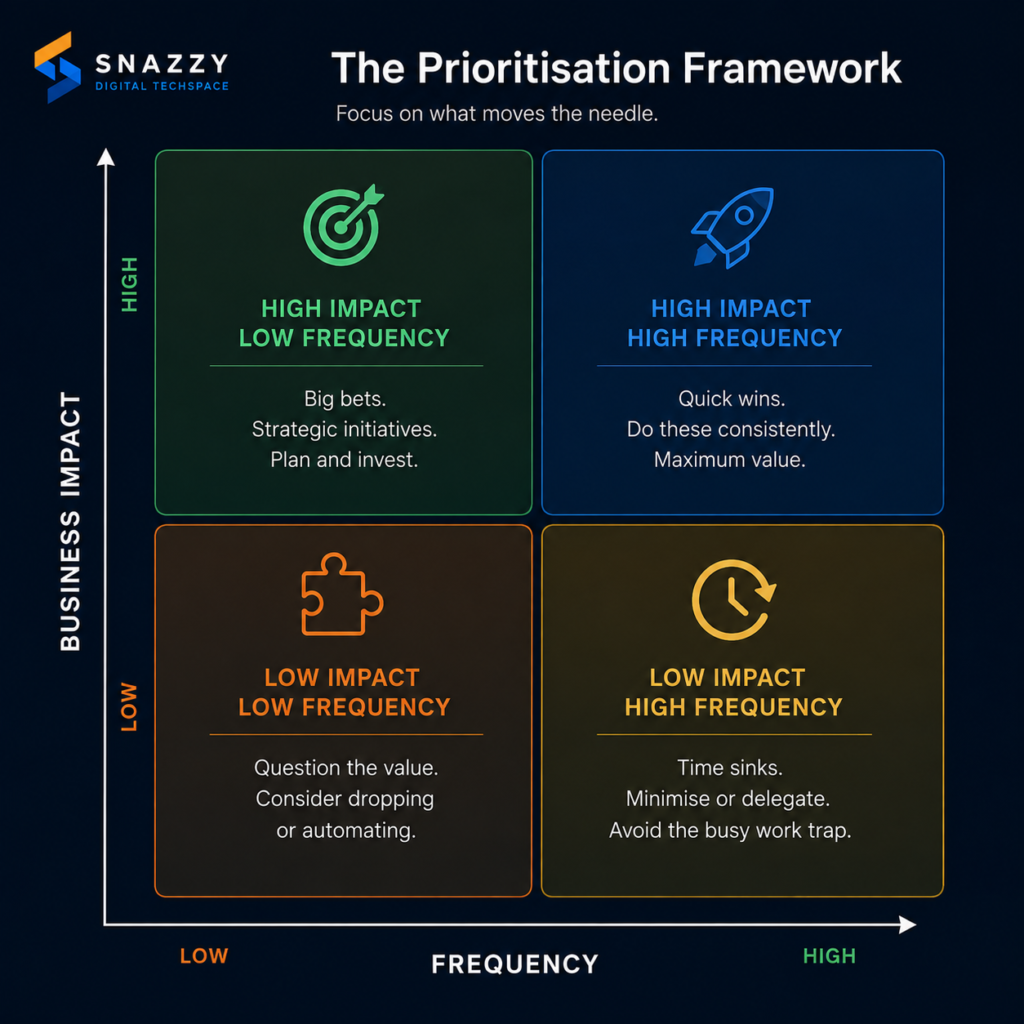
To help businesses decide what to automate first, we built The Snazzy Automation Priority Matrix™ — a simple model that scores any process against two factors: how often it happens, and how much impact it has on the business when it goes wrong or takes too long.
- Quadrant 1: Automate First (High Frequency, High Impact) — These are the processes costing the business the most, the most often. Repetitive approval bottlenecks, high-volume data entry, and customer follow-ups usually land here. This is where automation investment should start.
- Quadrant 2: Automate When Ready (High Frequency, Low Impact) — Frequent but low-stakes tasks, like routine scheduling or internal reminders. Worth automating, but not urgent — good second-phase work once Quadrant 1 is handled.
- Quadrant 3: Redesign Before Automating (Low Frequency, High Impact) — Infrequent but high-stakes processes, like quarterly compliance reporting or annual contract renewals. These deserve careful process design first; automation comes after the workflow is proven.
- Quadrant 4: Leave Manual (Low Frequency, Low Impact) — Rare, low-stakes tasks. The cost of building and maintaining automation here almost always exceeds the benefit. Leave these manual.
Plotting your current processes against this matrix takes an afternoon and typically reveals that the business has been automating Quadrant 4 work while Quadrant 1 bottlenecks sit untouched — usually because Quadrant 1 problems are harder to fix and Quadrant 4 tools are easier to buy.
Manual vs Automated Workflow
| Manual Process | Automated Process | |
|---|---|---|
| Consistency | Varies by person and day | Executes identically every time |
| Speed | Limited by staff availability | Runs continuously, independent of working hours |
| Error source | Human oversight, fatigue | Rule design — errors are systemic if they occur |
| Best suited to | Judgement calls, relationship touchpoints | Repetitive, rule-based, high-volume tasks |
| Cost driver | Ongoing staff time | Upfront build cost, low marginal cost after |
| Failure mode | Slows down, but usually self-corrects | Fails silently until someone notices |
Should We Automate This? A Quick Checklist
Before automating any process, run it through these questions:
- Does this process follow the same steps every time, regardless of who’s doing it?
- Has this process happened at least a few dozen times in the last quarter?
- Would a delay or error in this process meaningfully affect revenue, customer experience, or compliance?
- Is the process fully documented, with no undocumented exceptions?
- Does the process avoid requiring case-by-case human judgement?
- Is the current version of the process one the business is confident in, not still revising?
Five or six “yes” answers signal a strong automation candidate. Fewer than three means the process needs redesign, not automation, as the next step.
Measuring Automation ROI
Automation is often justified on time saved, but the more reliable measure is impact on the business outcome the process supports. A follow-up automation isn’t successful because it sends emails faster — it’s successful if response rates or conversion improve. An approval automation isn’t successful because it removes a manual step — it’s successful if the business closes deals or ships work measurably faster as a result.
Three questions to track after any automation goes live:
- Has the time-to-completion for this process meaningfully dropped?
- Has the error or exception rate gone down, not just moved elsewhere in the workflow?
- Has the business result the process supports — revenue, retention, delivery time — actually improved?
If the answer to all three is no after a reasonable measurement period, the automation solved a task, not a problem.
Frequently Asked Questions
What is business process automation?
Business process automation (BPA) is the use of technology to execute repetitive, rule-based business tasks without manual intervention, allowing staff to focus on work that requires judgement, creativity, or relationship management.
What should a business automate first?
Start with high-frequency, high-impact processes — repetitive tasks that happen often and meaningfully affect revenue, customer experience, or operational speed when they’re slow or error-prone, such as approval routing or customer follow-ups.
Can automation make a bad process worse?
Yes. Automation executes a process exactly as designed, at scale and at speed. If the underlying process is inconsistent or poorly defined, automation will replicate that inconsistency faster and more often, not fix it.
The Takeaway
Automation isn’t a strategy on its own — it’s a tool applied correctly, or incorrectly, to a process. The businesses that get real value from automation aren’t the ones that automate the most. They’re the ones that identify which processes are genuinely costing them time and money, fix those processes if they’re broken, and only then apply automation where it will compound the benefit.
Before your next automation purchase, map your processes against frequency and impact. The answer to what to automate first is usually already sitting in the bottleneck everyone complains about but nobody has fixed.

Joshua Fasinu is a Computer Science student and technology enthusiast passionate about using technology to solve real-world problems. At Snazzy Digital Techspace, he contributes to technology, automation, product development, and digital innovation, while also exploring AI, software development, and business process automation.
He is driven by a desire to learn, build, collaborate, and create digital solutions that make work and everyday life better.